
mksquashfs4 and unsquashfs
cd ./C6V2_EU_GPL/openwrt/
make tools/squashfs4/compile V=s
make will try to download source dependencies (xz-5.0.4 and squashfs4.2) from the internet. If it won't be able to do so because of, let's say, expired certificates you can manually download the files above and put them in the dl/ directory under openwrt/ then try building again.At the end of a successful build you should see something like:
make[3]: Leaving directory `/home/ub14/C6V2_EU_GPL/openwrt/build_dir/host/squashfs4.2/squashfs-tools'
touch /home/ub14/C6V2_EU_GPL/openwrt/build_dir/host/squashfs4.2/.built
make[2]: Leaving directory `/home/ub14/C6V2_EU_GPL/openwrt/tools/squashfs4'
make[2]: Entering directory `/home/ub14/C6V2_EU_GPL/openwrt/tools/squashfs4'
install -m0755 /home/ub14/C6V2_EU_GPL/openwrt/build_dir/host/squashfs4.2/squashfs-tools/mksquashfs /home/ub14/C6V2_EU_GPL/openwrt/staging_dir/host/bin/mksquashfs4
install -m0755 /home/ub14/C6V2_EU_GPL/openwrt/build_dir/host/squashfs4.2/squashfs-tools/unsquashfs /home/ub14/C6V2_EU_GPL/openwrt/staging_dir/host/bin/unsquashfs4
mkdir -p /home/ub14/C6V2_EU_GPL/openwrt/staging_dir/host/stamp
touch /home/ub14/C6V2_EU_GPL/openwrt/staging_dir/host/stamp/.squashfs4_installed
make[2]: Leaving directory `/home/ub14/C6V2_EU_GPL/openwrt/tools/squashfs4'
make[1]: Leaving directory `/home/ub14/C6V2_EU_GPL/openwrt'
Take note of the
install lines as that's where your binaries are:
/home/ub14/C6V2_EU_GPL/openwrt/staging_dir/host/bin/mksquashfs4
/home/ub14/C6V2_EU_GPL/openwrt/staging_dir/host/bin/unsquashfs4
sudo su
cd /home/ub14/mod/
/home/ub14/C6V2_EU_GPL/openwrt/staging_dir/host/bin/unsquashfs4 ./rootfs.squashfs
Expected output:
Parallel unsquashfs: Using 8 processors
1485 inodes (1485 blocks) to write

[===========================================|] 1485/1485 100%
created 1231 files
created 149 directories
created 254 symlinks
created 0 devices
created 0 fifos
wget https://archive.openwrt.org/attitude_adjustment/12.09/ar71xx/generic/packages/dropbear_2011.54-2_ar71xx.ipk
tar -xzvf ./dropbear_2011.54-2_ar71xx.ipk
cp ./data.tar.gz ./squashfs-root/
cd ./squashfs-root/
tar -xzvf ./data.tar.gz
rm ./data.tar.gz
Expected output:
./
./usr/
./usr/sbin/
./usr/sbin/dropbear
./usr/lib/
./usr/lib/opkg/
./usr/lib/opkg/info/
./usr/bin/
./usr/bin/ssh
./usr/bin/scp
./usr/bin/dbclient
./usr/bin/dropbearkey
./etc/
./etc/config/
./etc/config/dropbear
./etc/dropbear/
./etc/dropbear/dropbear_rsa_host_key
./etc/dropbear/dropbear_dss_host_key
./etc/init.d/
./etc/init.d/dropbear
Note how we overwrote the init and config for dropbear since TP-Link has a custom version of it in which they disable a lot of stuff.
nano ./etc/crontabs/root
* * * * * /bin/sh -c "sleep 15 && test ! -f /tmp/mod_ok && uci set dropbear.dropbear.RootPasswordAuth=on && uci set dropbear.dropbear.SysAccountLogin=on && uci set dropbear.dropbear.PasswordAuth=on && uci commit && touch /tmp/mod_ok"
openssl passwd -1 toorExample output (you can actually use this hash, the password is the same as above:
toor ).$1$nl492PMm$Tht5D7q0C5jg14E0GPw8i0
./etc/passwd (we can and will change this after our first login):nano ./etc/passwdReplace the x in the entry for the root user with the output obtained previously so it looks like this:
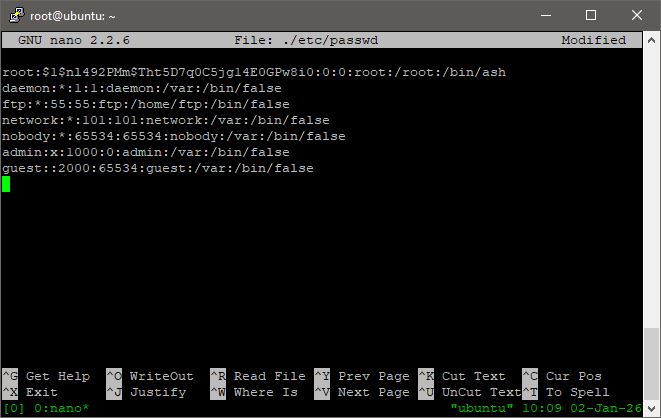
Since we modified binaries and added more content into files, we likely need to make some storage space to flash this back into the router. The amount needed (if needed at all) varies by model but for Archer C6 v2 I needed to make some space.
My best recommandation would be to head into
./www/ and look for some assets to remove. For this patch just remove the onemesh example gif since it's quite big (84Kb):rm ./www/webpages/themes/green/img/mesh/onemesh-network.1655114411095.gif
cd ..
/home/ub14/C6V2_EU_GPL/openwrt/staging_dir/host/bin/mksquashfs4 ./squashfs-root rootfs2.squashfs -nopad -noappend -root-owned -comp xz -Xpreset 9 -Xe -Xlc 0 -Xlp 2 -Xpb 2 -b 1048576
Example output:
Parallel mksquashfs: Using 8 processors
Creating 4.0 filesystem on rootfs2.squashfs, block size 1048576.
[===============================================================/] 1230/1230 100%
Exportable Squashfs 4.0 filesystem, xz compressed, data block size 1048576
        compressed data, compressed metadata, compressed fragments, no xattrs
        duplicates are removed
Filesystem size 6606.33 Kbytes (6.45 Mbytes)
        27.86% of uncompressed filesystem size (23708.60 Kbytes)
Inode table size 14058 bytes (13.73 Kbytes)
        25.95% of uncompressed inode table size (54174 bytes)
Directory table size 17762 bytes (17.35 Kbytes)
        50.46% of uncompressed directory table size (35203 bytes)
Number of duplicate files found 6
Number of inodes 1633
Number of files 1230
Number of fragments 21
Number of symbolic links  254
Number of device nodes 0
Number of fifo nodes 0
Number of socket nodes 0
Number of directories 149
Number of ids (unique uids + gids) 1
Number of uids 1
        root (0)
Number of gids 1
        root (0)
⚠ Make sure that you use the same block size and compression algorithm as the original otherwise you will either get bigger filesystems that don't fit into the router's flash or the kernel will fail to mount the fs and boot.
In such a case, you will have to do a tftp reflash.
rootfs2.squashfs onto the Ubuntu 22 machine